TL;DR: Amazon Virtual Bundles allow FBA sellers to group complementary ASINs into a single bundle landing page without physically repackaging inventory. This strategy is essential for cross-selling, increasing Average Order Value (AOV), and protecting your brand's buy box from hijackers, all while leveraging existing stock.
Key Takeaways
- Boost Revenue per Customer: Virtual bundles enable effective cross-selling, encouraging customers to purchase related items together in a single click, thereby significantly increasing your Average Order Value (AOV).
- No Repackaging Required: Unlike traditional kits, virtual bundles utilize your existing FBA inventory. You do not need to send separate stock to Amazon or pay for additional prep services to bundle items.
- Strategic Brand Control: Creating bundles is a Brand Registry feature that helps you control the "Buy Box" for packaged combinations, protecting your brand from unauthorized sellers who might otherwise group your products.
- SEO & Visibility Benefits: Virtual bundles receive their own unique detail pages (ASINs), allowing you to target new keywords and appear in separate search results, doubling your visibility.
Table of Contents
- Understanding the Power of Amazon Virtual Bundles
- The Psychology of Bundling: Why Customers Buy More
- Strategic Planning: What Should You Bundle?
- Step-by-Step Tutorial: How to Create Amazon Virtual Bundles
- Optimizing Your Virtual Bundle Listing for Conversions
- Advanced FBA Bundle Strategy and Troubleshooting
- Measuring Success: Analytics and A/B Testing
- FAQ
- References
Note on marketplaces: This guide is specifically optimized for the US market.
Understanding the Power of Amazon Virtual Bundles
In the hyper-competitive landscape of Amazon US FBA, finding an edge to increase profitability without skyrocketing costs is the holy grail for sellers. Enter Amazon Virtual Bundles. This feature, available exclusively to brand-registered sellers, is a game-changer for cross-selling products and increasing Average Order Value (AOV). But what exactly is it?
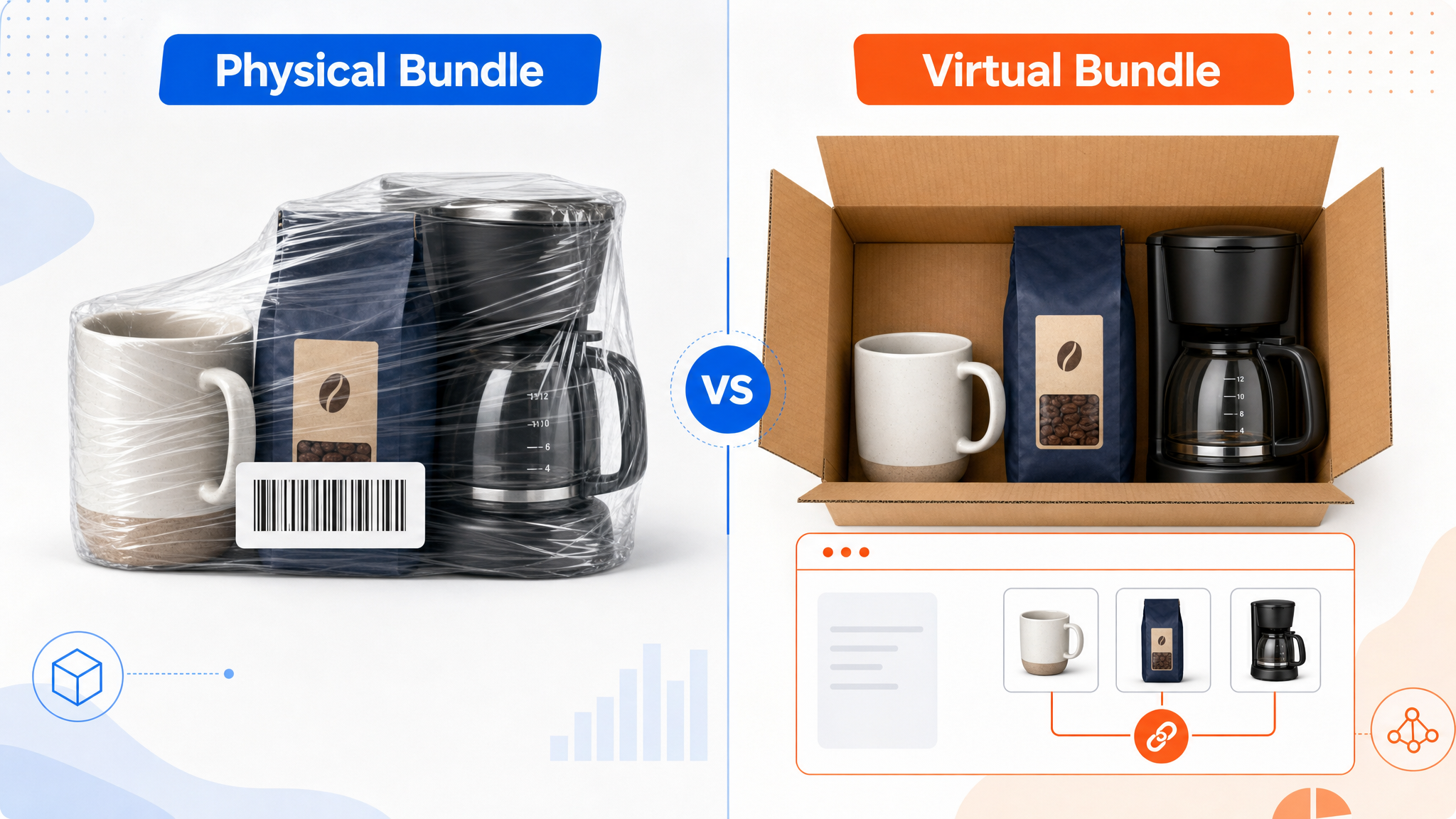
Unlike physical bundles, which require manufacturers or prep centers to shrink-wrap items together into a single barcode (FNSKU), a virtual bundle allows you to combine two to five distinct ASINs that are already sitting in Amazon's fulfillment centers. When a customer buys the bundle, Amazon simply picks and packs the individual items from the existing inventory and ships them in a single box.
This is a critical operational advantage. It eliminates the need for forecasting separate inventory for "bundles" versus "individual units." If you run out of the main component, the bundle simply goes out of stock, but you don't have dead stock of pre-assembled kits sitting in a warehouse. For growing sellers and large brands alike, this fluidity is a massive operational win.
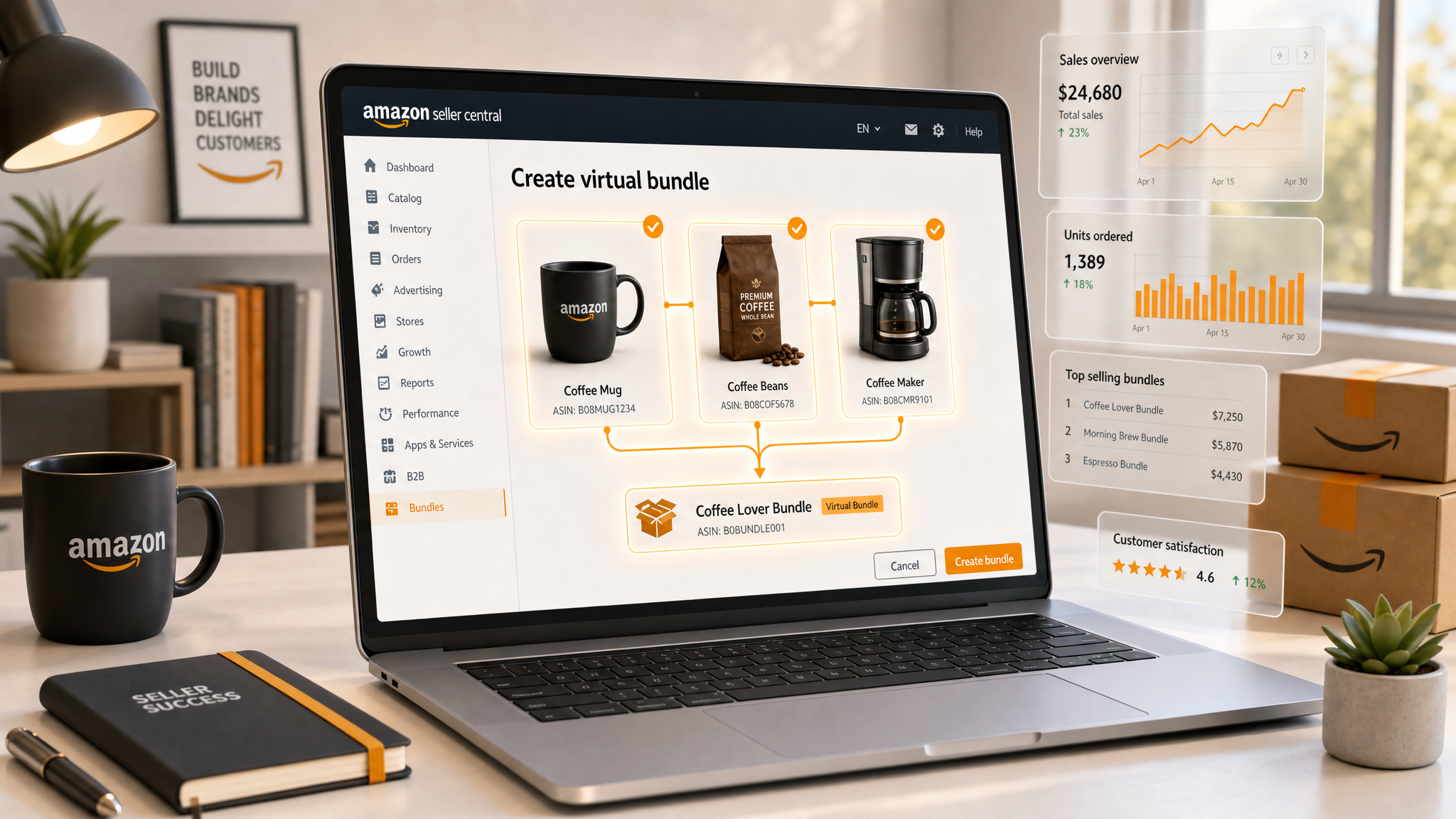
From a strategic standpoint, Virtual Bundles serve three primary purposes:
1. Cross-Selling Convenience: You solve the customer's problem of buying accessories. If they buy a camera, they likely need a memory card and a battery. By bundling these, you save them the search time and capture the revenue they would have likely spent with a competitor.
2. Buy Box Defense: This is a crucial brand protection strategy. Without a virtual bundle, opportunistic sellers might buy your products and resell them as a "bundle" at a markup. By creating your own official virtual bundle, you control the Buy Box, the branding, and the messaging for that combined offer.
3. Double SEO Real Estate: Because a Virtual Bundle gets a new ASIN and a new detail page, you get another chance to rank for keywords. You can optimize the bundle page for terms like "Camera Starter Kit" while your individual product ranks for "Digital Camera."
The Psychology of Bundling: Why Customers Buy More
To master cross-selling with virtual bundles, you must understand the consumer psychology that drives their effectiveness. It isn't just about putting two items together; it's about presenting an irresistible value proposition.
The Decoy Effect and Perceived Value
Shoppers on Amazon are constantly calculating value. When they see a product priced at $20 and another at $25, they compare based on price and features. However, when you introduce a bundle containing both for $40 (a seemingly higher absolute price), the focus shifts to the combined savings. Even if the monetary discount is small (e.g., 5%), the psychological perception of getting a "deal" on a complete package is powerful. This taps into the heuristic that "bundled is cheaper," reducing the friction of the purchasing decision.
Reducing Search Friction
Amazon is a convenience economy. A customer buying a new blender doesn't want to spend 15 minutes searching for the specific compatible tamper tool and cleaning brush. If they have to search, they might click a competitor's sponsored ad instead. By offering the bundle directly on the listing or in search results, you eliminate that search cost. You are saying, "Here is everything you need, delivered together." This "one-stop-shop" convenience is a massive driver of conversion rate optimization (CRO).
The "Completionist" Urge
In categories like skincare, cosmetics, or collectibles, customers often want the "full set." A virtual bundle satisfies the desire for completion. Buying a shampoo is functional; buying the "Shampoo + Conditioner + Hair Mask Bundle" is a ritual. By framing your bundle as a "Starter Pack," "Essential Kit," or "Total Solution," you tap into this psychological desire for a comprehensive experience rather than a transactional purchase.
For marketing managers, understanding these psychological triggers allows you to craft better copy and images (A+ content) that emphasize the outcome of using the products together, rather than just listing their features individually.
Strategic Planning: What Should You Bundle?
Not every combination of products will make a successful virtual bundle. Random grouping confuses customers and hurts conversion. To effectively cross-sell Amazon products, you must curate your bundles based on logic and data.
1. The "Hero" Accessory Strategy
Identify your best-selling product (your "Hero" item). Look at your "Frequently Bought Together" data (available in Amazon Brand Analytics or SellerSprite tools). If 20% of people buying your Yoga Mat are also buying your Yoga Block, that is a prime candidate for a bundle. You are formalizing an existing behavior. The benefit here is that you capture the margin on the accessory that might otherwise go to a competitor if the customer chooses a different block.
2. Consumable + Durable Cross-Selling
This is the most effective long-term strategy. Bundle a durable good (like a coffee maker, diffuser, or printer) with a consumable (coffee grounds, essential oils, or ink cartridges). The high purchase friction is on the durable good. Once they commit to buying the machine, adding the consumables to the bundle is a low-friction upsell. This increases your immediate revenue and ensures the customer tries your brand's consumables first, increasing the likelihood of Subscribe & Save retention later.
3. Complementary Scenario Bundling
The synergy must be obvious. If the customer has to ask, "Why would I need this with that?" the bundle fails.
4. The "Discount" Math
When setting your virtual bundle price, remember that Amazon adds the prices of the components and subtracts your discount. Your margin on the bundle must be calculated carefully. A good rule of thumb for beginners is to offer a 5-10% discount off the individual prices. This is enough to trigger the "deal" psychology without eroding your profits to zero. However, if you are cross-selling accessories with very high margins, you can afford a deeper discount on the bundle to drive the volume of the main unit.
Step-by-Step Tutorial: How to Create Amazon Virtual Bundles
Now that we have the strategy down, let's get into the operational weeds. Creating a virtual bundle is a straightforward process within Seller Central, but attention to detail is crucial.
Prerequisites:
- You must be Brand Registered.
- Both the main component and the bundle must be fulfilled by Amazon (FBA). You cannot create virtual bundles for Merchant Fulfilled Network (MFN) items.
- Components must be new physical products (no digital content or hazardous materials that can't be shipped together).
Step 1: Navigate to the Bundles Tool
Log in to Amazon Seller Central. Go to the Inventory tab and select Manage All Inventory. Look for the "Bundles" button or search for "Virtual Product Bundles" in the search bar. Alternatively, you can find it under the Brand Registry benefits section. Click on "Create Bundle".
Step 2: Enter Basic Information
You will be prompted to enter the Bundle Name, Brand, and Manufacturer. It is best practice to use SEO-friendly keywords in your bundle name if it doesn't distort the brand image. For example, "Brand X Coffee Maker Starter Kit." Select the marketplace (US) and the catalog you want to list in.
Step 3: Select Components
This is the most critical step. You must select 2 to 5 ASINs from your active FBA inventory. Search for your products by ASIN or title. Note: You cannot bundle the same component twice (e.g., 2x Toothpaste). Each component in the bundle must be distinct. Drag and drop to arrange them. The first product listed is usually considered the "main" product and represents a large portion of the visual weight.
Step 4: Set the Pricing (Offer)
Amazon will display the sum of the current prices of the individual items. You will then input your "Savings Amount." If the items cost $50 total, and you enter a $5 savings, Amazon will automatically calculate the bundle price as $45. You can also set a specific "Sale Price" or "Minimum Advertised Price" restrictions here if applicable. Ensure your price complies with Amazon's Fair Pricing Policy.
Step 5: Upload Images and Write Content.
For the main image, you must create a "composite image." This is a new image that shows all the components laid out together. It must comply with Amazon's main image rules (pure white background, 1000x1000 pixels). Do not just upload the image of the main product; the bundle must look like a set.
For the title, bullet points, and description, you cannot simply copy-paste the content from the main product. You must write unique content that describes the bundle. Focus on the value of the set. Mention what is included in the package. You can learn more about copywriting optimization in our comprehensive Amazon SEO and Listing Optimization Guide.
Step 6: Review and Publish
Review the summary page. Check for errors in the component list or pricing. Once you submit, it usually takes a few hours for the new ASIN to appear in the catalog. It will start in an "Incomplete" or "Draft" status until Amazon processes it, and then it will become "Active."
Optimizing Your Virtual Bundle Listing for Conversions
Publishing the bundle is just the beginning. To truly increase AOV with virtual bundles, you must treat the new bundle ASIN as a premier product. It needs its own optimization strategy.
Advanced FBA Bundle Strategy and Troubleshooting
As you scale your use of virtual bundles, you will encounter unique scenarios. Managing these correctly is vital for maintaining your seller metrics and inventory health.
Inventory Disruption and Split Shipments
Review Aggregation
Managing Returns
Protecting Your Buy Box
Measuring Success: Analytics and A/B Testing
How do you know if your FBA virtual bundle strategy is working? You must move beyond vanity metrics and look at the data.
Key Metrics to Track:
- Bundle-to-Unit Ratio: For every 100 units sold of your main product, how many are sold as part of a bundle? If this ratio is high, it means your customers value the convenience of the bundle.
- Conversion Rate (CVR): Compare the CVR of the bundle listing vs. the individual listing. A lower CVR on the bundle might indicate you priced it too high or the image is confusing.
- Cart abandonment: Are customers adding the bundle but then removing it? This might suggest the discount isn't deep enough to justify the upfront cost.
A/B Testing Your Bundle Listing
You can test:
- Main Images: Does a flat lay image convert better than a lifestyle shot of the bundle?
- Title: Does "Starter Kit" convert better than "Value Pack"?
- Price Points: You can experiment with different savings offers to see the elasticity of demand.
A/B Testing Your Amazon Listing (Manage Your Experiments). By continuously testing, you can maximize the cross-selling potential of your bundles and ensure you are leaving no revenue on the table.
FAQ
What are the requirements for creating virtual bundles on Amazon?
To create virtual bundles, you must be Brand Registered in the Amazon Brand Registry program. All component products must be Fulfilled by Amazon (FBA) and have active inventory. You can bundle between 2 to 5 distinct ASINs. The products must be new physical products; you cannot include used items, digital goods, or warranty services.
How do Amazon virtual bundles help with cross-selling and increasing average order value?
Virtual bundles encourage customers to purchase complementary items simultaneously in a single click. By grouping a high-demand product with accessories or consumables, you increase the total transaction value (AOV). The psychological trigger of getting a "deal" on a complete package also helps convert hesitant buyers who would otherwise only purchase the main item.
Can I use virtual bundles for products that are not fulfilled by Amazon (FBA)?
No. Amazon Virtual Bundles is a feature strictly available for FBA (Fulfilled by Amazon) inventory. You cannot use Merchant Fulfilled Network (MFN) or FBM products as components. This is because Amazon needs full control over the inventory logistics to pick, pack, and ship the components seamlessly to the customer as if they were a single unit.
Do virtual bundles have their own reviews and ratings?
Yes, a virtual bundle is assigned a unique ASIN and therefore has its own product detail page and separate review section. It does not inherit the reviews from the individual component products. Sellers should actively utilize Amazon Vine or solicit reviews following Amazon's Terms of Service to build social proof for the new bundle listing.
What happens if one component of the bundle runs out of stock?
If any single component of a virtual bundle goes out of stock at Amazon, the entire bundle listing and offer become unavailable. The customer will not be able to purchase the bundle until all components are back in stock. This synchronization ensures you never sell a promise you cannot keep. This is why it is critical to bundle items with stable, high-velocity inventory.
Next Steps
- Analyze your current inventory to identify your top-selling "Hero" products and their most frequent complementary accessories.
- Sign up for SellerSprite to get deep keyword and market data for your potential bundle niches.
- Create your first "Hero + Accessory" virtual bundle in Seller Central following the steps above, focusing on a high-quality composite main image.
References
- Amazon Seller Central: Amazon SEO and Listing Optimization: The 2026 Ultimate Guide View
- SellerSprite Blog: A/B Testing Your Amazon Listing (Manage Your Experiments) View
By SellerSprite Success Team
The SellerSprite Success Team is a group of seasoned Amazon e-commerce experts dedicated to empowering sellers with actionable data, advanced SEO strategies, and operational insights. With years of experience helping brands scale on the Amazon marketplace, we specialize in decoding algorithm updates, optimizing listing performance, and driving sustainable growth for FBA businesses worldwide.


